Seedance is ByteDance Seed’s audio-video model family. Version 2.5 connects storytelling, references and editing into a fuller creative process.
Maximum length per clip
30 sec
Video extensions supported
2
Picture and sound generation
Audio-video
01 / Seedance 2.5
Describe professional shot language precisely
Official examples show shot-size changes, tracking, pans and timestamp direction. Specify medium shots, close-ups, camera paths and action endpoints, plus the line of action and eyelines for reverse shots. These are production instructions; adherence still needs review.
Previs brief: shot size, camera position, path, screen direction and action endpoint.
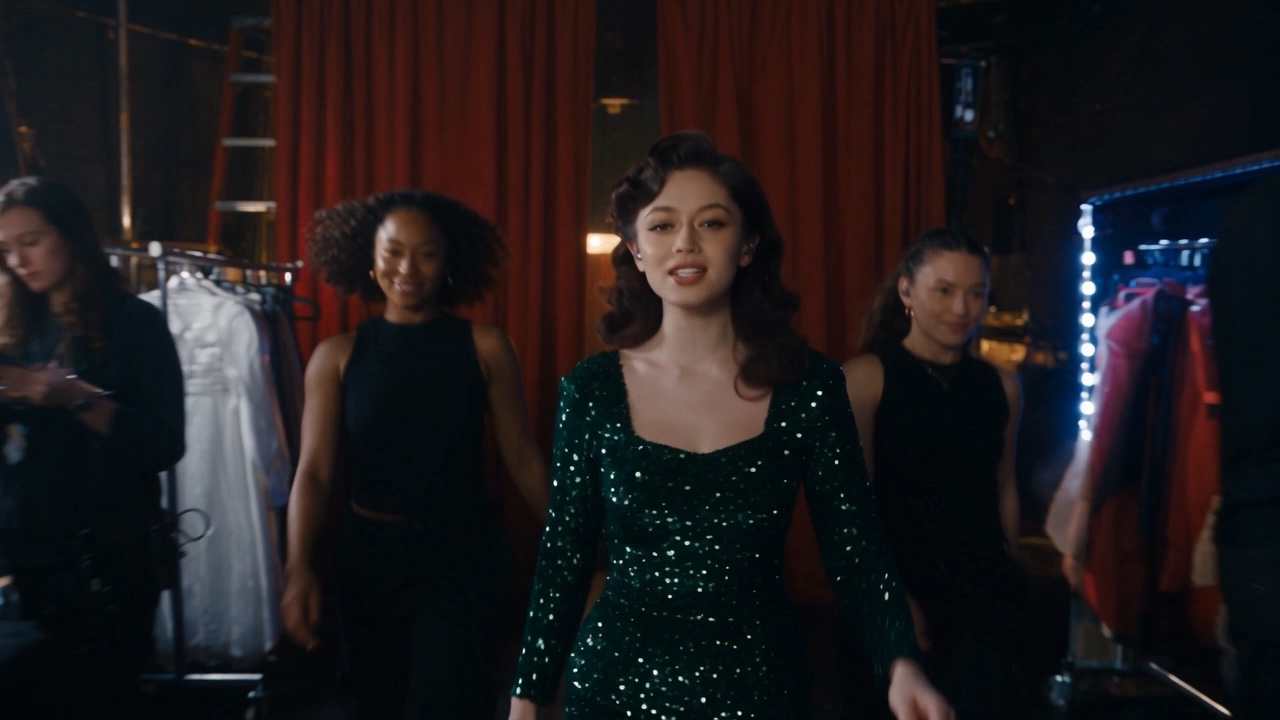
From backstage to the spotlight, in one continuous take.
Official performance example · Camera movement and acting
Shot language: push-in, tracking, orbit and wide shot
Blocking: backstage movement to stage performance
Audio-video beats: singing and performance
02 / Seedance 2.5
Multimodal assets and character consistency
Assign character look images, scene concepts, video and audio references distinct roles for appearance, space, camera movement and voice. The official introduction describes stronger multi-character appearance and voice retention; complex interactions can still drift.
Asset anchors: front and side looks, costume, props and a shared atmosphere moodboard.
Turn clay-render space and blocking into a finished scene.
Official clay-render example · Space, motion and camera direction
References: clay-render space and character/scene design
Control: shot sizes, motion paths and lighting
Previs: spatial structure to a stylized scene
03 / Seedance 2.5
Native audio-video and long-take storytelling
The joint-generation architecture supports clips up to 30 seconds and two extensions. Describe pauses, breathing, ambience and action beats together. White-model control and green-screen editing can also help plan blocking and compositing.
Review dialogue timing, lip sync, action sounds and transitions; joint generation is not an error-free sync guarantee.
Official green-screen edit · Subject and environment
Edit target: retain the subject, replace the environment
Scene changes: training, locker room and match
Compositing review: clothing, light and gait
Example media comes from ByteDance Seed’s official release. Copyright belongs to its respective owners; these are not Panco-generated results.
In a production workflow
Four steps to a short-drama handoff
Connect the script, character look references and atmosphere moodboard into a four-step delivery process: anchor the assets, create moving storyboards for Previs, generate picture and sound together, then review continuity before editing.
01
Break down the script and anchor assets
Identify conflict, action and emotional endpoints. Organize character looks, costume, props and an atmosphere moodboard; fix character IDs, lighting direction and spatial relationships.
02
Animate storyboards for Previs
Generate medium shots, close-ups and shot/reverse-shot candidates by scene beat. Specify tracking, pushes, pans, camera positions and action endpoints; review rhythm and the line of action first.
03
Generate picture and sound together
Describe dialogue, breathing, action sounds and ambience in the same brief. Use pauses and action beats to express synchronization, then check lip sync, delivery and timing.
04
Review continuity before editing
Check costume, makeup, props, eyelines, screen direction, lighting and action joins. For a 9:16 version, also check headroom, subtitle safe areas and character entrances.
Short-drama Prompt Recipes
Original Panco recipes for trial shots, not tested outputs. Duration, aspect ratio and look are creative suggestions rather than verified API settings; check the actual service.
Before final delivery
Check identity, costumes, props, spatial relationships, motion continuity and dialogue synchronization. Review extension joins separately, and inspect composition, occlusion, edges and compositing compatibility for white-model or green-screen material.
Night station · 20 seconds · Emotional turn
Setting: a station at night, cool overhead light, two adult characters. Keep the clothing and appearance from the reference images.
0–5 seconds: medium shot. A woman stops at the platform edge, holding an old ticket. An arriving train is audible.
5–12 seconds: slowly push in. A man enters and quietly says, “You came after all.” She looks up, pauses and replies, “I came to give this back.”
12–20 seconds: cut to a side close-up of both characters. She offers the ticket; he reaches out, then stops. Maintain spatial and action continuity. End with train noise and a brief silence, without background music.
Close-up of an adult man. Retain the reference face, gold-rimmed glasses and dark suit. Low-key cool lighting, shallow depth of field and a slow push-in. He lowers his gaze, then raises it with a restrained smirk, looking screen left. A cinematic 35mm film look, low breathing and faint fabric movement, without music.
Confrontation: shot/reverse shot
Suggested: 9:16 · 15 sec · Two character looks + scene · Fixed axis
Two adult characters confront each other in an office. Keep the reference costumes, setting and light. 0–5s: medium shot establishes positions. 5–10s: her close-up, looking screen right: “You knew all along.” 10–15s: his reverse close-up, looking screen left; a pause, then “I was waiting for you to ask.” Stay on the same side of the axis and maintain ambience.
An adult investigator approaches a door at the end of a narrow corridor. 0–10s: medium rear tracking shot, cool sidelight and growing footsteps. 10–20s: move beside her into a close shot; a short knock from inside makes her stop. 20–30s: slowly push toward her hand as she grasps the handle without turning it. One continuous-take intent, with consistent door position, screen direction and costume.
Meet the Seedance versions
Explore how the family has evolved, then choose from the models offered in your actual creative workspace.
Seedance 2.5
Up to 30 seconds of audio-video per clip and two video extensions. Refined referencing and audio-video editing, with white-model control and green-screen editing for professional production. These are provider capabilities; Panco availability requires separate verification.
Character consistency, audio-video sync and 9:16 short dramas.
Reuse the same character look references and IDs, with fixed facial features, hair, costume and props. The official release describes stronger appearance and voice retention, but references do not guarantee perfect consistency. Review changes of scene, occlusion and complex interactions; edit or regenerate drifting shots.
Compared with generating silent footage and dubbing it separately, joint generation lets a single brief express dialogue, ambience and action beats together. The official introduction emphasizes sync and continuity. This is not a ranking against every video model; lip sync, pauses and sound cues still need review.
Use 9:16 as a composition target where the actual service supports that ratio. Favor medium shots and close-ups, allow subtitle safe areas and maintain eyelines and the line of action. This is production guidance, not confirmation that every provider or Panco production endpoint supports the setting.
The official page states up to 30 seconds per clip and support for two video extensions. Clip length is not the total extended duration. The reference page does not specify one overall extended-duration limit; check the actual product entry point.
The official introduction emphasizes understanding reference intent and camera language, moving from motion transfer toward creative interpretation. Identify the camera movement, action rhythm or performance to retain and the characters, setting and story to create anew.
White-model control can communicate spatial layout and blocking intent; green-screen editing can support compositing material. Input formats, parameters and access conditions depend on the provider. Occlusion, edges and shot matching still need review.
This page explains the provider’s public capabilities and creative methods. It does not confirm integration of every feature into Panco. Panco availability of extension, audio-video editing, white-model control and green-screen editing has not been verified. Check the actual product for supported features.
Your next story starts here.
Bring your script, references and shot ideas into Panco’s creative workspace.
This page describes provider capabilities; examples are not Panco outputs. Panco availability of 30-second generation, extensions, clay-render control and green-screen editing has not been verified. Check the actual product for supported features, pricing and settings.