How Much Does an AI Short Film Cost? Start with the Shot List
On this page
The subscription price is only part of the cost. Count the shots you need, allow for retries, and add image, audio and editing work. Here is a simple way to plan the budget.
01Count the shots and retries
Suppose a 60-second scene needs twelve usable clips of five seconds each. Two attempts per clip means 24 generations. Four attempts means 48. These are planning examples, not measured success rates or Panco prices.
For each shot, multiply the planned attempts by the current price for your chosen model and settings. Add image preparation, audio and editing separately. If you only keep two seconds of a five-second clip, count two usable seconds. Editing and export in Panco are completely free. Editing costs here mean your time or separately purchased services; video, image and audio generation are budgeted separately at the current rates for the selected model.
| Plan | Generation attempts | What to check |
|---|---|---|
| Two tries per shot | 12 × 2 = 24 | Did your test shots need more tries? |
| Four tries per shot | 12 × 4 = 48 | Which shots needed the extra tries? |
| Different limits for each shot | Add the planned tries | Separate dialogue, action and object shots |
02Test three kinds of shots
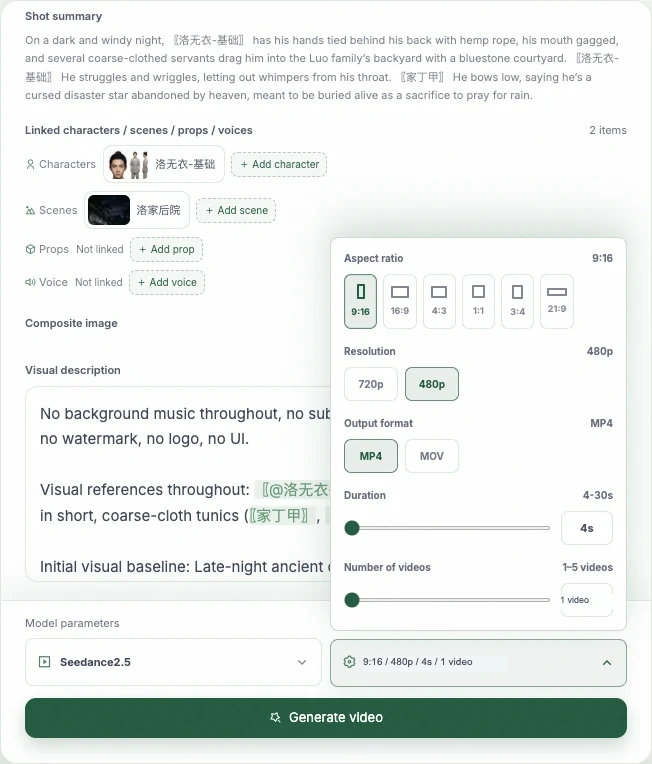
Try a face close-up, an action or interaction, and a simple object shot. Use the characters and style you plan to keep. Before submitting in Panco, check the selected model, length and output size.
Write down how many attempts you made and how many seconds you kept. Also note why a clip failed. A good-looking clip still needs another attempt if the clothing changes or it cannot join the next shot.
03Keep one row for each shot
Use the worksheet below in your own spreadsheet. Add the shot, needed seconds, planned attempts, actual cost and result. You can check Panco’s storyboard and generation history while filling it in.
Shot | Seconds needed | Model and settings | Planned attempts | Actual attempts | Generation cost | Seconds kept | What to change
01: Doorway view | 3 | Fill in current selection | | | | |
02: Hand holding the door key | 4 | Fill in current selection | | | | |
Keep image, audio and editing costs in separate rows.
Editing and export in Panco are completely free. Editing costs here mean your time or separately purchased services; video, image and audio generation are budgeted separately at the current rates for the selected model.
Generation cost per usable second = total generation cost ÷ seconds kept in the final edit.
04Know what to change before trying again
Wrong face: check the reference. Unclear action: ask for fewer movements. Cut-off dialogue: check the clip length. Bad framing: fix the still image first. Change one thing, then compare the result.
Set a retry limit for a difficult shot. If you reach it, try a simpler way to show the same story. A hand holding a hidden door key may be enough; you may not need a moving shot of both characters.
Inspect actual prompts and references in generation history05Compare tools with the same shot
Use the same references, action and target length. Count all paid attempts, including the ones you reject. Check export options and commercial terms before choosing a service.
Look up Panco’s current plans and the settings you will actually use. Leave time and money for sound, subtitles and the final edit. The useful comparison is the cost of getting a clip you can keep.
Check current Panco plansDecide when to use image-to-videoPlan manageable dialogue shots06Budget questions
Can I multiply the final length by the price per second?
That leaves out rejected attempts. Also budget for images, audio, editing and any outside services.
Should every test use the highest resolution?
Use a supported setting that lets you check the problem. Before delivery, also test the settings you will use for the final output.
Does Panco fill in this budget sheet?
This is a manual worksheet. Use the storyboard and generation history to help record what you tried.
07Use the production cost guide for estimates
This article explains how to fill in a budget worksheet. Use the cost guide for the main estimate: shot count, retries, accepted seconds and team allocations. Keep actual charges separate from assumptions.
AI short-drama production cost guide