AI Character Consistency for Short Dramas
Start with a reference that you can approve, then reuse it deliberately. Character consistency is a production process: the same face, clothing and objects must survive changes of framing, action and light.
Create a small reference set with a clear job
Approve a front or three-quarter view with a readable face and complete outfit. Add a side or rear view only when the scene needs that angle. Compare those views before using them together: a new angle that redesigns the clothing introduces a contradiction.
Write down fixed details such as hair length, collar shape, bag side and shoe color. Keep lighting and pose instructions separate from identity. A scene can change the light without changing who the character is.
Select project references with @ mentions
Keep the approved character, location and important props in project assets. When writing a storyboard prompt, use the actual @ selection control to attach the intended asset, then verify the material card. Typing a familiar name alone is not a substitute for selecting the correct reference.
For a two-person scene, give each person a separate reference and action. Use positions visible in the frame rather than an ambiguous “he” or “she.” Begin with a simple composition so you can judge whether the references are being interpreted as intended.
- Select the approved character asset.
- Choose the scene and any necessary prop.
- Describe one visible action and the intended framing.
- Verify reference attachments and the selected model.
- Generate a small test and compare the result with the approved reference.
Compare the details that identify the character
Review the face at the beginning, middle and end of a clip. Then check the outfit as a construction: collar, sleeves, fasteners and accessories should connect sensibly across views. Similar colors alone are not enough.
The outfit reference below makes the collar, fastening and sleeve shape available for comparison. Look at these fixed details before deciding whether a new angle still belongs to the same costume.
| What changed | First check | Next action |
|---|---|---|
| Face | Asset selected, view, image quality | Use a clearer reference; simplify framing. |
| Outfit | Reference version and fixed details | Remove contradictory instructions and isolate the clothing change. |
| Prop | Count, size, hand and contact | Simplify the interaction and review the contact frames. |
| Position | Screen direction and eyeline | Revise staging or the adjoining shot. |
Fix one failure without redesigning the scene
If the face is correct but the jacket changes, do not rewrite the entire person. Correct the relevant reference or clothing instruction and keep the accepted camera and action. Save the revision separately so you can compare the change.
If two people merge or exchange identities, reduce the interaction and establish each person separately. A close-up or reaction shot may serve the story better than another complicated wide shot. Review the replacement in the scene before accepting it.
Keep the accepted reference attached to the scene
Record the reference version used by each accepted shot. When a costume changes in the story, label the new version explicitly instead of replacing the old reference silently. A team reviewer should be able to tell whether a difference is intentional.
Review adjacent shots in the editor. A character may be consistent in isolation but appear to jump in size, direction or light at the cut. Use the complete sequence as the final check.
One reference, three first attempts: inspect what changed
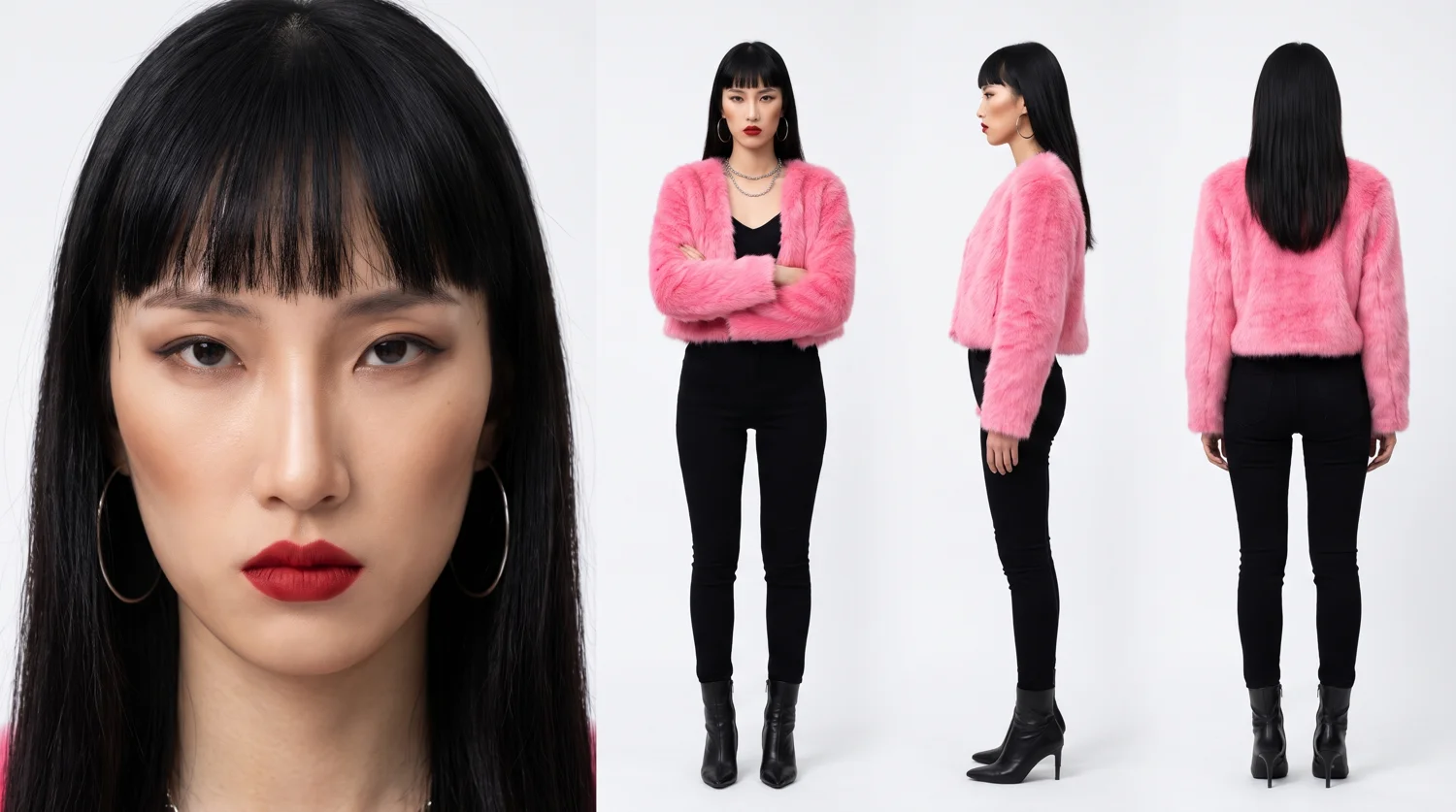
The reference below shows black bangs, an open pink cardigan, a dark inner top and a necklace. Choose the project image, confirm the attachment and insert its reference from the @ menu before generating. Reusing a character name without attaching the image is a different input.
The three original clips illustrate what to inspect: clothing construction, important props and eyeline. Their model variants and resolutions differ, so use them to practice reviewing a take rather than as an overall ranking.
The same instruction, including a costume contradiction
The Chinese interface inserted @图片1 as the image token. In an English interface, select the corresponding Image 1 attachment before pasting the remaining instruction. The wording below translates that token label only; the rest is the actual submitted English prompt.
@Image1 Use the adult woman in this reference as the only person. One continuous four-second live-action medium shot in a quiet office, camera locked at eye level. Preserve her straight black hair with bangs, pink long-sleeved sweater and black trousers. One white envelope lies on the desk in front of her and stays there. She looks slightly to the right and says exactly: "I kept the letter." Then she closes her mouth and waits. Both hands remain on the desk, empty; no other person speaks. Natural room tone, no music, no captions, no cuts.
The reference shows an open, textured pink cardigan over a black top, while the submitted prompt says “pink long-sleeved sweater.” That inconsistency is part of the test and has not been edited out. MiniMax follows the closed-sweater wording more closely; Seedance and Wan retain more of the open-cardigan reference. We cannot attribute that difference solely to model identity control. For a cleaner next test, align the garment description with the image before submitting.
MiniMax H3: a stable desk shot with costume drift
MiniMax keeps the black bangs and pink clothing, but the open cardigan becomes a closed sweater. Compare the neckline and front opening with the reference. If an earlier shot has established the open cardigan, matching the color alone will not preserve the costume.
The white object reads more like a sheet of paper than a distinct envelope. If the envelope is a clue in your story, check that the viewer can recognize it before accepting the take.
Seedance Mini: a clearer envelope and reference-like cardigan
Seedance retains a recognizable open cardigan, dark inner top and jewelry. The envelope flap is clearer in the inspected frames. Once the face and costume look right, watch the prop through the action: its shape and position must still make sense.
Only the upper body appears here, so this clip cannot show whether the trousers match. Review what is actually visible rather than treating a similar face as approval of the entire character.
Wan 3.0: stable wardrobe cues, a more frontal eyeline
Wan retains the open-cardigan cues and necklace, but the gaze is more frontal than the requested look to the right. If the next shot shows a colleague on that side, the eyeline may break the conversation.
Compare the take with the shot it will follow. A recognizable costume does not automatically give you the right performance or composition.
What this test changes in the next shot
Before trying another model, align the costume wording with the picture. For this reference, describe an open pink cardigan over a dark top, then state the action separately. Keep the approved reference and change only the instruction responsible for the mismatch.
Review the revised take beside its neighbors and save the accepted time range. These three clips illustrate what to inspect. For a broader choice of model, consult the separate guide to official strengths and public preference evaluations.
Frequently asked questions
No. References guide generation, but framing, motion, model behavior and conflicting instructions can still change the result. Review the generated clip rather than only its thumbnail.
Use the smallest coherent set that explains the required identity and view. Check the chosen model’s actual input limits; different versions and services can accept different reference types.
First identify whether the error comes from the selected reference, prompt or one clip. Revise the failed part and compare it with the accepted neighboring shots.